Fabula EQ moves with the music

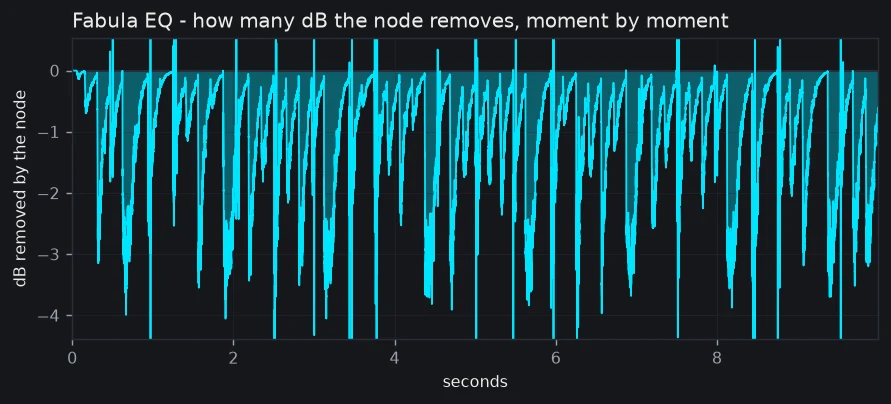
Put Fabula EQ on a lead vocal and place one bell at 7 kHz with its dynamics switched on. As long as the sound in that area stays under the threshold, the band rests at 0 dB and does not touch the voice. When the ess arrives, it dips by up to six decibels, then lets go in a fraction of a second.
All 24 nodes in Fabula can work that way: each one has its own threshold, its own attack and its own release.
One node, a few numbers, two directions
The factory preset Vocal De-ess (dyn) is a single node: bell at 7 kHz, gain 0 dB, Q 3, Range -6 dB, Threshold -28 dB, Ratio 6:1, Attack 1 ms, Release 60 ms. Gain zero means that at rest the node does not change the sound.
Turn Range the other way and the same node opens up when the sound in its area drops under the threshold. Try it on a brushed snare, a soft acoustic guitar or a light kick: the band can lift the quiet passages and step aside when the playing gets louder. One knob, both directions, and the sign is the switch.
Ask for 12 kHz, get 12 kHz
The classic digital way of building a filter bends the curve near the top of the spectrum. Fabula has Analog Match, switched on by default, which follows the analogue curve instead. A +12 dB bell at 12 kHz (Q 1) in a 44.1 kHz session stays within 1 dB of the analogue curve. A low-pass at 18 kHz reads -5.12 dB at the top of the band (22.05 kHz), like the analogue filter. With Analog Match off, which is the classic method, the bell is out by more than 5 dB and the low-pass drops to zero right at the top. And none of it adds latency.
A gain that keeps up with the music
The gain of a band is updated 6,000 times a second (at 48 kHz). Fabula uses a filter built to change all the time, not the classic one, which can jerk when it is changed like this. Push a node hard and fast and watch the reduction readout: the band goes down and comes back. Nodes you leave off cost almost nothing, so you can keep all 24 at hand and switch on only the ones you need. A node with dynamics on works harder than a plain one, so switch it on where it counts.
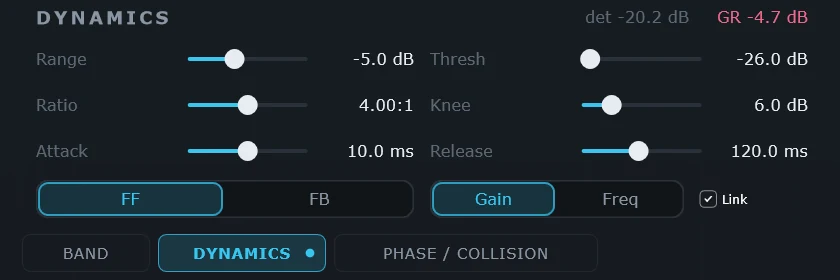
Latency is zero in the Natural phase mode, the default: Fabula goes on the vocal while the singer is still in the room. The Linear mode adds delay, from about 21 to 341 ms at 48 kHz depending on quality, and the dynamic nodes stay minimum-phase even there. Each node has seventeen settings; the dynamics ones have a page of their own, DYNAMICS, one tab away, and stay out of the way until you need them.
Open Fabula EQ on the take you care most about, load Vocal De-ess (dyn) and listen to what it does on the sibilants. If the node does not move, the take is under the threshold: lower it until the GR readout on the DYNAMICS page moves on the esses.
The instrument
