Wavetable synthesizer
Rapid
Rapid
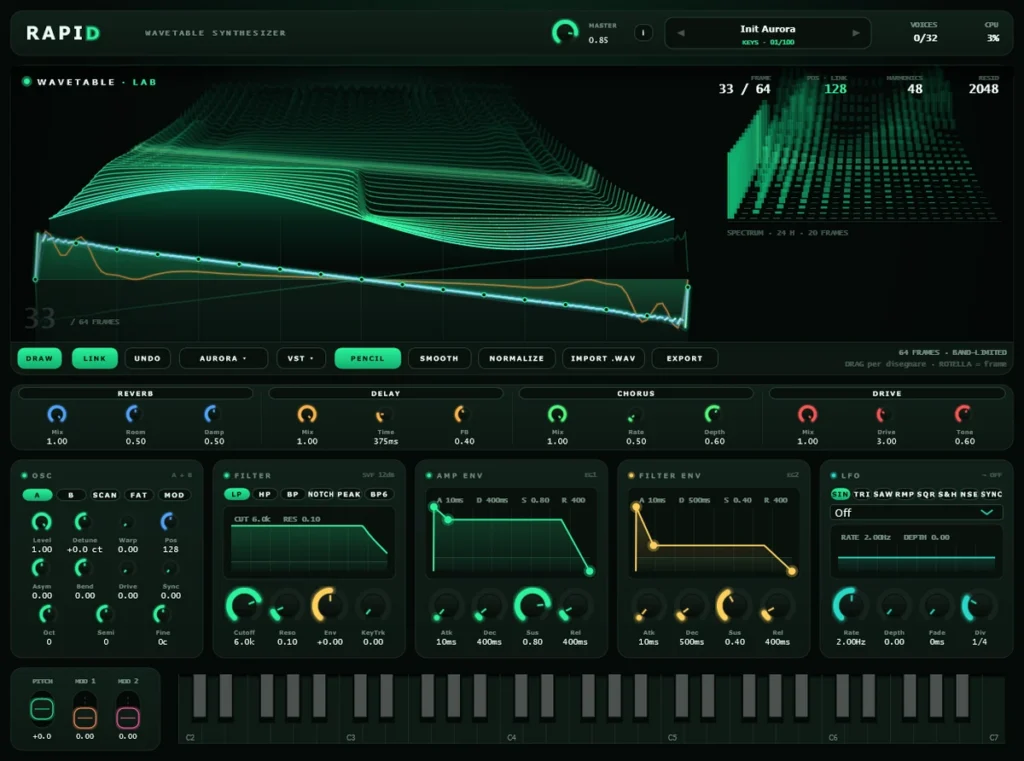
Nothing unusual in the layout. What is unusual is who owns the table: it is not a factory bank you pick from, it is a per-instance table you draw with the mouse, import and export as a .wav, and which travels inside the DAW project. The 12 starting tables are bases to modify, not a closed catalogue.
v1.0.0


betadownload and try
Perpetual licence · 12 months of updates · full trial before you buy
In beta, and you try all of it
This is not a cut-down version: it is the complete instrument. We are asking you to use it and tell us what does not add up.
3 seconds at −18 dBFS · the clock restarts at every launch
v1.0.0
One licence covers both formats. 12 months of updates from purchase; the instrument keeps working afterwards.
You draw while a note is sounding.
Your drawing goes into a separate copy. The editor waits 75 ms after your last movement, builds the new table on the side and swaps it in all at once, so the sound never has to wait for it. You see the curve change at once; the sound catches up when you pause or let go.
The Wavetable Lab
The display is not a scope. It is the work surface.
Two drawings on top of each other: at the back the landscape, the 64 frames stacked in perspective; in front the frame being edited, the large curve on a phase grid.
Draw
Drag on the curve to rewrite the waveform - x is phase, y is the value from -1 to +1. The wheel scrolls frames; dragging on the landscape scrubs through them. The trail between two points is interpolated, so a fast drag leaves no holes.
Import and export
The table reads and writes as a .wav of 64 frames of 2048 samples. What you build here leaves with you, and what you have elsewhere comes in.
A clean top end
Every frame is rebuilt in five simpler versions, and each note reads the one that fits its pitch. With Warp, Asym, Bend, Drive and Sync at zero, that keeps the metallic fizz out of your drawing up to about 3.7 kHz at 44.1 kHz.
Who it is for
For people who want to make the waveform, not choose it.
A wavetable synth is judged by what it lets you put into the table. This one lets you put in whatever you can draw or record.
Sound design from scratch
Draw, smooth, normalise, import a .wav, then read it from two points at once with the two oscillators.
Modern production
100 presets in 13 categories, 4 curated effects in series, and 4 VST3 insert slots for whatever else you already own.
Big, fast sounds
Real unison up to 4 stacked copies on the first oscillator - actual voices beating against each other, not a stereo widener.
The filter
One filter, 6 modes, and a graph you can grab.
A state-variable filter, SVF 12 dB/oct slope, with low-pass, high-pass, band-pass, notch and peak from the panel. The response is drawn above the knobs, and the second envelope is wired to the cutoff by default.
- Cutoff, resonance and envelope amount, with the curve drawn live
- Both envelopes are editable with the mouse on their own graph
- The LFO offers 7 shapes and syncs to the host tempo

Effects
4 in series, plus 4 slots for everything else.
Drive, chorus, delay and reverb, curated and always in that order - the chain a wavetable patch actually needs, without a routing page to plan first. After them, 4 VST3 insert slots take third-party plugins inside the instrument, so a patch can carry its own processing into any project.

What is measured
149 parameters, and a net that renders every preset.
The golden test renders each preset from the real processor and compares five families of metrics against a versioned reference. They are tolerances, not a bit-exact comparison: the point is to tell an audible regression from the last-bit differences that AVX2 reordering produces.
Alongside it, a parameter bank drives every control in the automation list to both ends of its travel and compares the signal fingerprint - it fails if an inert parameter shows up undeclared. That is a measurement, not a reading of the source. The voice cap adapts to load while you play, and is disabled in offline rendering: losing voices in a bounce would make the export differ from what you heard.


Specifications
Keep looking
Looking for something else?
The other instruments and effects are one click away.
Downloads
Try Rapid
Windows downloads are installers (.msi, or the .exe inside a ZIP); macOS downloads are .pkg installers.
Rapid
The wavetable is yours
Nothing unusual in the layout. What is unusual is who owns the table: it is not a factory bank you pick from, it is a per-instance table you draw with the mouse, import and export as a .wav, and which travels inside the DAW project. The 12 starting tables are bases to modify, not a closed catalogue.
ikonabit-Rapid-1.0.0 beta
VST3AUStandalone
File names
- ikonabit-Rapid-1.0.0.pkg
- ikonabit-Rapid-1.0.0.msi