Aura106 sits behind the voice

Aura106 is the keyboard you put behind a singer and leave there. Play a chord and it stays exactly where you put it: warm, unhurried, wide, with nothing in it that wants to be in front of the voice.
The filter is modelled on the IR3109 chip: calculated like the circuit, not a recording of one. Raise the resonance and, in our model, the bass does not thin out: push it to halfway on a held chord and the chord is still there underneath.
Two chorus buttons, marked I and II
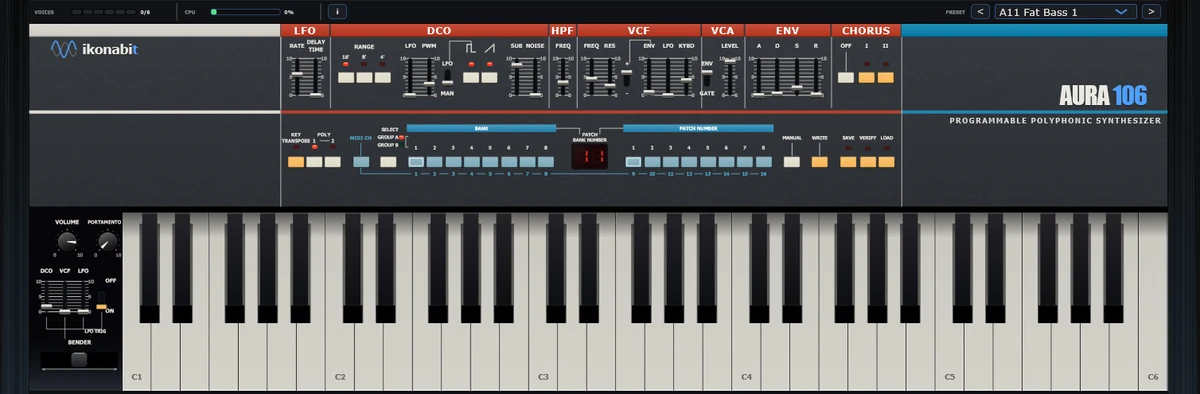
On the right of the row of controls there are two chorus buttons, marked I and II. With both of them up Aura106 is mono: dead centre, dry, one point between your speakers. Hold a chord and press I. The sound opens out and starts to sway, slow and wide, as if it had started breathing. One full sway takes about two seconds. Press II on its own and the sway is quicker and deeper. Press both and you hear a blend of the two movements. Whichever you pick, the chord can stop being a spot in the middle of the mix and start to feel like the space around it.
Do it with the chord held down: the whole demonstration takes two seconds.
Pad in mono under the verse, a chorus button down at the hook, and the track opens without touching a fader. Many factory patches do it for you: 62 of the 128 load with I or II already on. Switch it off and you hear the patch dry and mono. None of them uses both buttons together, so that blend is yours to try.
Six voices, one of everything else
One oscillator, one filter, one envelope, one LFO, all on one screen. The single envelope can open the filter and shape the volume at the same time, so brightness and loudness arrive together. Two controls pull them apart: a switch makes the volume a plain on and off, and the ENV slider sets how far the envelope opens the filter. Few controls, all in view: you find your way fast.
Where to start
- B47 Pad PWM Chorus II — a slow pad: about half a second to come in, with the pulse width drifting gently under the chord and chorus II on.
- B81 Pad Chorus II — an octave down, saw and pulse together, half a second to come in, chorus II.
- A12 Pad Chorus — a saw with some sub under it and chorus I: try it against the chorus II of the other two.
- B88 Bass Dry — an octave down, saw and pulse with the sub, chorus off: it stays dead centre.
The LFO can ease in slowly, up to three seconds: each time you start playing from silence, the vibrato on a long note arrives gradually, the way a singer’s does. 128 patches, numbered A11 to B88 and lit in red in the middle of the panel. VST3 and standalone.
Load B47 Pad PWM Chorus II, hold a chord and try the chorus buttons one at a time and together.
The instrument
